
Deploying Docker Containers in AWS and Wandering Around Clusters


Or, at least learning more about each. And self-learning is the important part, right?

And welcome back to not only AWS, but Docker as well. This is a bit of an older post, as I have more experience with Terraform's containerized environments in Azure over AWS.

Instructions

There is a Console First Run Wizard, here.
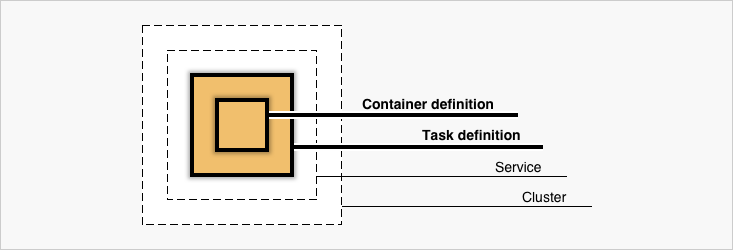
AWS Docker Diagram
I have an exceedingly vague idea of what this means in full. Cluster is essentially the pack of what you need to run something. Bing (Yes, Bing), says it's a 'logical grouping of tasks or services'.

So 'containers' are the 'physical' grouping, if we consider 'physical = code'.

We can define a service, which allows us to run and maintain a specified number of simultaneous instances of a task definition.

It sounds a little like a limited pool of IP addresses. This is the free tier, AWS only gives us one.


The instructions emphasize Elastic Load Balancing...which took me a while to realize and find.


And now the service is set up and running, so I can go to my Load Balancer and click the DNS name.


We did it!
The spreadsheet is to keep track of people at Target Companies.


Other questions:

  • How can I edit this page?

Next; Create a Docker Registry.


EMPLOYERS: Hey cool, synergy!

Comments

Popular posts from this blog

Making KPI Dashboards with PowerBI

 While this is the free tier, I cannot share or collaborate with others, nor can I publish content to other people's workspaces, but they will not stop me from screenshooting and recording these self-taught adventures,so! I'm doing this because I idly searched "Mattel careers" and "Information Technology", and seeing a bulletpoint saying the following: Analytical and reporting skills such as creating dashboards and establishing KPIs such as experience with PowerBI, Cognos, Tableau, and Google Data Lake/AWS is preferred And thought "Well, I've used Tableau, and I've heard about PowerBI,  even if its in-demandness is questionable , so how similar is it? And can I write about it?"  First, PowerBI (PIB) does have a downloadable, local version, but apparently Windows-only. I could download the .exe but I couldn't run it / drag it to applications on my MacBook.  Not a problem, we'll use the online SaaS version, and a dataset found here, ...

Log Sorting with AWS CloudWatch, AWS CloudWatch Insights

 The cool thing is, I was contracted to make these videos in collaboration with CloudAvail Technology Consulting to help people decide which service they wanted to use for their logging - AWS CloudWatch, AWS CloudWatch Insights, DataDog, or New Relic. I'm searching through nginx logs. I have accompanying videos of each service that you can find on the CloudAvail Youtube page; See these links to go to the DataDog and NewRelic posts.   The idea was to be subjective in the videos, but I can be objective on my personal blog.     CloudWatch     The syntax is odd, but easy to grasp. Sort log data by IP addresses, message codes, and status codes. The simplest query system, but not quite robust.   Insights       The syntax has changed - Vastly. I see major SQL influences. You can see that in how the parse function works - in this case, it's often taken pieces of a pre-existing standard - in this case, message - and breaking them into their own c...

Infracost, The Cloud Cost Manager

I nfracost integrates with Infrastructure as Code technologies to check the costs of the infrastructure you're creating or changing, in multiple currencies, multiple cloud platforms, and can integrate with multiple repos and pull requests.  Hooray!   The single-sentence description is 'Shift FinOps Left". Not sure what that means, but let's look at the software itself. The tag policies feature seems similar to the regulations one can set up in Trivy, like I've done over here , to make Terraform code adhere to certain rules. I installed it via chocolatey on Windows 11, using it to check my Azure resources. Don't forget to get the API key as well, it is a lot easier to set up than you think, and used the CLI in the program; here's that documentation (Option 1) . It does not check the free tiers of Azure and uses On-Demand prices by default. This is the output for infracost breakdown ;  You'll notice that it does round down; My cost is 15.41$, and the t...